CompTIA Network+ N10-009 (V9) Performance-Based Questions (PBQs)
Lab Summary
0 of 40 Questions completed
Questions:
Information
You have already completed the lab before. Hence you can not start it again.
Lab is loading…
You must sign in or sign up to start the lab.
You must first complete the following:
Results
Results
0 of 40 Questions answered correctly
Your time:
Time has elapsed
You have reached 0 of 0 point(s), (0)
Earned Point(s): 0 of 0, (0)
0 Essay(s) Pending (Possible Point(s): 0)
Categories
- Not categorized 0%
-
You didn’t pass the exam.
-
Congratulations! You’ve passed the exam.
- 1
- 2
- 3
- 4
- 5
- 6
- 7
- 8
- 9
- 10
- 11
- 12
- 13
- 14
- 15
- 16
- 17
- 18
- 19
- 20
- 21
- 22
- 23
- 24
- 25
- 26
- 27
- 28
- 29
- 30
- 31
- 32
- 33
- 34
- 35
- 36
- 37
- 38
- 39
- 40
- Current
- Review
- Answered
- Correct
- Incorrect
-
Question 1 of 40
1. Question
Sort the layers (from layer 1 to layer 7) to form the OSI Model.
-
Application Layer
-
Session Layer
-
Transport Layer
-
Physical Layer
-
Data link Layer
-
Network Layer
-
Presentation Layer
View Answers:
CorrectIncorrect -
-
Question 2 of 40
2. Question
Match the network topology to the description:
Sort elements
- Mesh
- Star
- Bus
- Ring
-
A type of network in which all the computers are inter-connected to each other.
-
A network topology in which each network component is physically connected to a central node such as a router or switch.
-
A type of network topology in which all devices in the network are connected by one central RJ-45 network cable or coaxial cable.
-
A type of network topology in which each device is connected to two other devices on either side via an RJ-45 cable or coaxial cable.
CorrectIncorrect -
Question 3 of 40
3. Question
Fill in the blank with the network type:
-
A collection of devices connected together in one physical location, such as a building, office, or home.
A computer network that interconnects users with computer resources in a geographic region of the size of a metropolitan area.
A network that extends over a large geographic area, connecting multiple LANs.
A computer network that links two or more devices using wireless communication to form a LAN within a limited area.
CorrectIncorrect -
-
Question 4 of 40
4. Question
Order these provider links from the slowest transmission speed to the fastest:
-
Leased line
-
Cable modem
-
Digital subscriber line
-
Satellite
View Answers:
CorrectIncorrect -
-
Question 5 of 40
5. Question
Order these cables from the slowest transmission speed to the fastest:
-
Coaxial
-
Fiber
-
Cat 6
-
Cat 5
View Answers:
CorrectIncorrect -
-
Question 6 of 40
6. Question
You are tasked with configuring a home office wireless access point following the details below. Additionally, you are requested to assign the first possible IP address to PC_1 and the second possible IP address to PC_2.
WiFi CONFIGURATION DETAILS
Network SSID: LabsDigest
Network ID: 10.0.0.0/16
Host ID: 10.0.0.1
Click on the icons to configure the devices…

 CorrectIncorrect
-
Question 7 of 40
7. Question
PC_1 is unable to access the internet. As a network administrator, you are tasked with troubleshooting the issue.
NETWORK DETAILS.
Network ID: 140.20.40.0/16
Available IPv4 addresses: 140.20.40.10 - 140.20.40.12
Default gateway: 140.20.40.1
Click on the icons to configure the devices…
CorrectIncorrect -
Question 8 of 40
8. Question
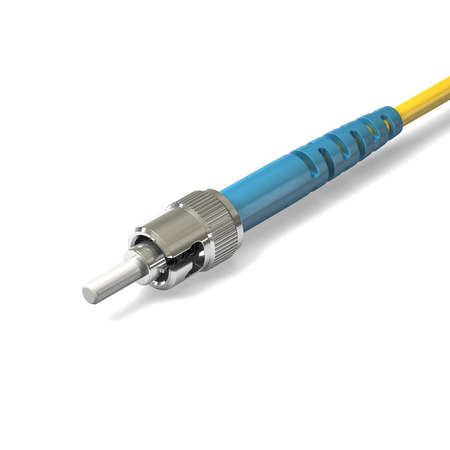
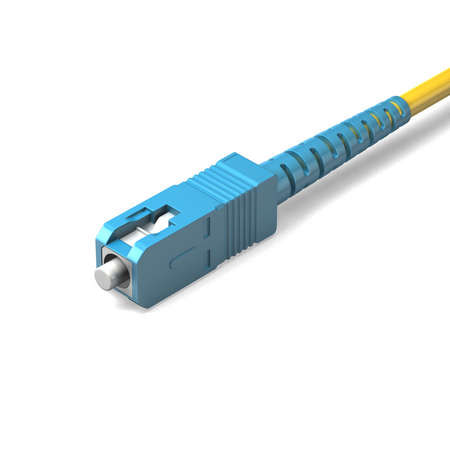
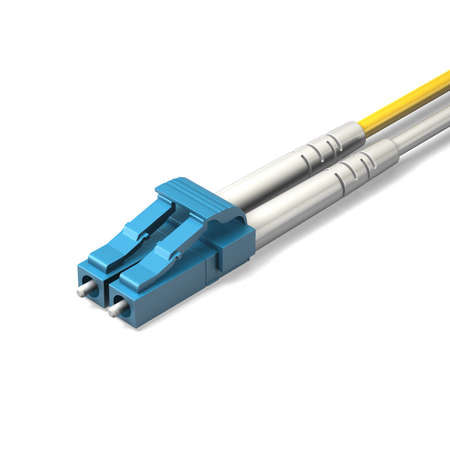
Match the fiber optic connector to the image:
Sort elements
-
Straight tip (ST)
-
Subscriber connector (SC)
-
Lucent connector (LC)
CorrectIncorrect -
-
Question 9 of 40
9. Question
You are tasked with creating a network with 8 subnets and 30 hosts per subnet. Configure the router following the details below.
ROUTER CONFIGURATION DETAILS
Network ID: 192.168.2.0
Number of Subnets: 8
Number of Hosts/Subnet: 30
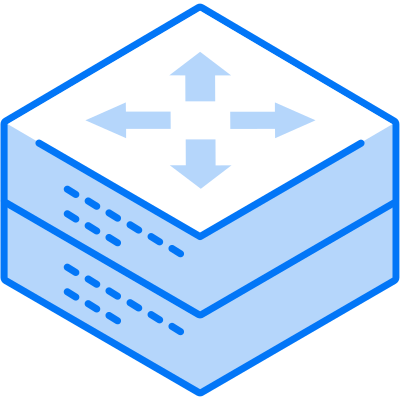
Click on the icon to configure the device…
 CorrectIncorrect
-
Question 10 of 40
10. Question
Match the IP address to the default subnet mask:
Sort elements
- 255.255.255.0
- 255.0.0.0
- 255.255.0.0
-
196.5.4.3
-
8.0.2.6
-
177.56.5.2
CorrectIncorrect -
Question 11 of 40
11. Question
You’re the network technician for a mid-sized enterprise migrating several services to a new data center. Before going live, your manager asks you to verify that the right physical or virtual appliances are placed at the correct points in the topology to control traffic flow, segment networks, and protect workloads.
Sort elements
- A device that makes forwarding decisions based on Layer 3 addressing to connect different IP subnets and apply policies like NAT and ACLs across network boundaries.
- A Layer 2 device that forwards frames using MAC address tables and supports segmentation features such as VLANs and trunking.
- A stateful policy enforcement point that permits or blocks traffic based on configured rules; may include deep inspection but primarily focuses on allow/deny decisions rather than traffic shaping.
- A monitoring appliance that passively analyzes traffic to detect suspicious patterns and generate alerts without altering packet flows.
- An inline security control that inspects traffic and can actively drop, modify, or otherwise block malicious packets before they reach the destination.
- A traffic distribution appliance that presents a single service endpoint and spreads client requests across multiple backend servers using algorithms like round-robin or least connections.
-
Router
-
Switch
-
Firewall
-
Intrusion Detection System (IDS)
-
Intrusion Prevention System (IPS)
-
Load balancer
CorrectIncorrect -
Question 12 of 40
12. Question
You’re assisting with a branch-office rollout that requires internet access control, shared storage for a small team, and reliable Wi-Fi coverage. The design includes front-end web caching, back-end shared file space, and point-to-point connectivity to extend wireless to a detached building.
Sort elements
- A client-side intermediary that fetches internet content on behalf of internal users, enabling caching, access control, and URL filtering for outbound requests.
- A file-level storage appliance that shares directories over the LAN using protocols like SMB or NFS, appearing to users as network shares.
- A block-level storage fabric (often using Fibre Channel or iSCSI) that presents raw LUNs to servers for high-performance, low-latency disk access.
- A radio device that provides 802.11 wireless connectivity to client devices and bridges them onto a wired LAN segment.
- A centralized system that manages multiple lightweight wireless radios, handling configuration, channel/power optimization, and roaming policies across APs.
- A point-to-point or point-to-multipoint wireless link that connects two wired network segments over distance, often used to span to an outbuilding.
-
Proxy (forward proxy)
-
Network-attached storage (NAS)
-
Storage area network (SAN)
-
Wireless access point (WAP)
-
Wireless LAN controller (WLC)
-
Wireless bridge
CorrectIncorrect -
Question 13 of 40
13. Question
Your company is launching a public-facing customer portal with knowledge base, web app, and reporting. You must select appropriate service models (SaaS/PaaS/IaaS), establish secure connectivity, and prepare a pilot before go-live while meeting compliance and minimizing operational overhead.
Steps (Shuffled):
-
Establish identity, access, and baseline policies aligned to the shared responsibility model.
-
Collect business, compliance, and latency requirements for the web app, knowledge base, and reporting.
-
Stand up secure connectivity (site-to-site VPN/Direct Connect) and private DNS to the cloud environment.
-
Map each component to a service model (e.g., SaaS for knowledge base, PaaS for web runtime, IaaS for legacy reporting VM).
-
Conduct a pilot in a non-production subscription/account; validate security controls, performance, and costs.
-
Select cloud provider and primary region(s) that meet data residency, availability, and latency targets.
-
Conduct a pilot in a non-production subscription/account; validate security controls, performance, and costs.
-
Collect business, compliance, and latency requirements for the web app, knowledge base, and reporting.
-
Stand up secure connectivity (site-to-site VPN/Direct Connect) and private DNS to the cloud environment.
-
Establish identity, access, and baseline policies aligned to the shared responsibility model.
-
Map each component to a service model (e.g., SaaS for knowledge base, PaaS for web runtime, IaaS for legacy reporting VM).
-
Select cloud provider and primary region(s) that meet data residency, availability, and latency targets.
View Answers:
CorrectIncorrect -
-
Question 14 of 40
14. Question
A branch team needs a small analytics stack: dashboards for sales (SaaS BI), a managed database (PaaS), and a legacy ETL tool that only runs on a VM (IaaS). You must prepare the landing zone, enforce access controls, wire up connectivity, and perform acceptance testing before go-live.
Steps (Shuffled):
-
Configure CI/CD or automated deployment for the PaaS database and ETL job artifacts; enable secrets management.
-
Create a cloud landing zone with management groups/projects, standardized networking, logging, and tagging.
-
Provision the PaaS database service and the IaaS VM for the legacy ETL tool; integrate the SaaS BI tenant.
-
Define RBAC/IAM roles, conditional access, and key management policies consistent with shared responsibility.
-
Implement private connectivity and name resolution between on-prem and cloud (VPN/ExpressRoute + private endpoints).
-
Execute end-to-end validation: data ingestion via ETL, PaaS DB performance, SaaS BI dashboards; document DR/backup and obtain sign-off.
-
Create a cloud landing zone with management groups/projects, standardized networking, logging, and tagging.
-
Configure CI/CD or automated deployment for the PaaS database and ETL job artifacts; enable secrets management.
-
Execute end-to-end validation: data ingestion via ETL, PaaS DB performance, SaaS BI dashboards; document DR/backup and obtain sign-off.
-
Provision the PaaS database service and the IaaS VM for the legacy ETL tool; integrate the SaaS BI tenant.
-
Implement private connectivity and name resolution between on-prem and cloud (VPN/ExpressRoute + private endpoints).
-
Define RBAC/IAM roles, conditional access, and key management policies consistent with shared responsibility.
View Answers:
CorrectIncorrect -
-
Question 15 of 40
15. Question
You’re finalizing a Layer 2/Layer 3 design for a new campus network. The design review asks you to confirm how specific traffic types will behave across VLANs and subnets so you can place ACLs and optimize switch behavior.
Sort elements
- One sender to one specific destination address; forwarding is based on the exact host address on the same subnet or via routing to another subnet.
- One sender to many receivers that have explicitly joined a group address; devices that did not join do not receive the traffic.
- One sender to the topologically nearest of multiple identical service endpoints announcing the same address, typically selected by routing metrics.
- One sender to all hosts on the local subnet only; frames are not routed to other subnets.
- One sender to all hosts on a specified remote IPv4 subnet using that subnet’s broadcast address; routers may block this for security.
- One sender to a single host address that the switch has not learned; the switch temporarily floods frames out all ports in the VLAN except the ingress port.
-
Unicast
-
Multicast
-
Anycast
-
Broadcast (limited)
-
Directed broadcast
-
Unknown unicast
CorrectIncorrect -
Question 16 of 40
16. Question
During a hybrid data center migration, you must confirm how discovery, service access, and group streaming traffic will behave. The change board requires precise classification to avoid accidental cross-subnet floods or misrouted service requests.
Sort elements
- Point-to-point delivery from a single sender to a single destination host address, forwarded by switching/routing to that unique endpoint.
- Group-oriented delivery where only hosts that join the designated group receive the traffic; non-members do not process it.
- Service access model where multiple servers advertise the same destination address and routing delivers the flow to the nearest instance.
- One-to-all delivery within a broadcast domain; not forwarded by routers into other subnets by default.
- Ethernet-level “all F’s” destination used to reach every station on the local segment for functions like ARP requests.
- Switch behavior where frames destined for an unknown MAC are replicated out all VLAN ports (except the source) until the MAC is learned.
-
Unicast
-
Multicast
-
Anycast
-
Broadcast
-
Layer 2 broadcast (frame)
-
Unknown unicast flooding
CorrectIncorrect -
Question 17 of 40
17. Question
You’re preparing a new IDF that aggregates building backbones (MPO trunk to core), floor uplinks (duplex LC to SFPs), legacy cross-connects (SC/ST), and user drops (RJ45). You must terminate and test connectors correctly while minimizing contamination risk and ensuring standards compliance.
Steps (Shuffled):
-
Terminate fiber and copper: install MPO trunk, LC duplex to SFP cages, necessary SC/ST jumpers, and crimp RJ45 using the selected TIA-568 variant.
-
Power down/cover optics and place fiber dust caps; implement ESD and eye-safety precautions.
-
Label ports and update the as-built with connector types, patch panel positions, and cable IDs.
-
Clean/inspect fiber endfaces and adapters with approved tools; verify polarity/keying for duplex and MPO.
-
Run certification: OTDR/OLTS for fiber (loss, reflectance) and wiremap/cert for copper; remediate any fails.
-
Map requirements to the panel: define which positions use MPO, LC, SC/ST, and which use RJ45; select TIA-568A or 568B for copper.
-
Map requirements to the panel: define which positions use MPO, LC, SC/ST, and which use RJ45; select TIA-568A or 568B for copper.
-
Run certification: OTDR/OLTS for fiber (loss, reflectance) and wiremap/cert for copper; remediate any fails.
-
Label ports and update the as-built with connector types, patch panel positions, and cable IDs.
-
Power down/cover optics and place fiber dust caps; implement ESD and eye-safety precautions.
-
Clean/inspect fiber endfaces and adapters with approved tools; verify polarity/keying for duplex and MPO.
-
Terminate fiber and copper: install MPO trunk, LC duplex to SFP cages, necessary SC/ST jumpers, and crimp RJ45 using the selected TIA-568 variant.
View Answers:
CorrectIncorrect -
-
Question 18 of 40
18. Question
A new lab rack shows flapping links and poor video quality on RF runs. You suspect mixed connector types (LC vs SC vs ST), incorrect copper cords (RJ11 in RJ45 jacks), and coax mismatches (BNC vs F-type). Restore reliability without introducing new faults.
Steps (Shuffled):
-
Replace wrong leads/adapters with correct ones: LC↔SC duplex where needed, MPO-to-LC breakout for leaf switches, proper RJ45 patch cords, and correct BNC/F-type jumpers; ensure MPO keying/polarity.
-
Document fixes and update rack elevation and cable schedule; add “do-not-use” tags to removed cords.
-
Clean and re-seat all optical connectors after replacements; verify latch/bayonet engagement and strain relief.
-
Review the path from endpoint to patch panel to device; note symptoms (flaps, errors, loss) and capture interface logs.
-
Visually identify connector types and seating: check LC/SC/ST latching, anycast-style identical addresses not applicable, and confirm BNC (bayonet) vs F-type (threaded) on coax runs.
-
Verify media/grade compatibility: Cat6 for RJ45 (not RJ11), correct RG-type for F-type/BNC, and duplex fiber types (OM3/OM4/OS2) match transceiver specs.
-
Document fixes and update rack elevation and cable schedule; add “do-not-use” tags to removed cords.
-
Clean and re-seat all optical connectors after replacements; verify latch/bayonet engagement and strain relief.
-
Replace wrong leads/adapters with correct ones: LC↔SC duplex where needed, MPO-to-LC breakout for leaf switches, proper RJ45 patch cords, and correct BNC/F-type jumpers; ensure MPO keying/polarity.
-
Review the path from endpoint to patch panel to device; note symptoms (flaps, errors, loss) and capture interface logs.
-
Verify media/grade compatibility: Cat6 for RJ45 (not RJ11), correct RG-type for F-type/BNC, and duplex fiber types (OM3/OM4/OS2) match transceiver specs.
-
Visually identify connector types and seating: check LC/SC/ST latching, anycast-style identical addresses not applicable, and confirm BNC (bayonet) vs F-type (threaded) on coax runs.
View Answers:
CorrectIncorrect -
-
Question 19 of 40
19. Question
You’re designing a new headquarters network using the three-tier hierarchical model. The team needs to confirm where to locate inter-VLAN routing, default gateway redundancy, policy enforcement, and edge services so that the core stays fast and the access layer stays simple.
Sort elements
- High-speed, non-blocking backbone that forwards traffic between distributions with minimal features; avoid packet filtering and keep convergence fast.
- Aggregates access blocks, hosts SVIs and first-hop redundancy when using Layer 2 access; applies ACLs/QoS and performs inter-VLAN routing.
- Connects end hosts; sets VLAN membership, provides Power over Ethernet, and enforces 802.1X and port-security; limited or no routing in classic L2 designs.
- The place to terminate VLAN interfaces (SVIs) and run HSRP/VRRP/GLBP for user subnets when the access is Layer 2.
- The layer where inbound/outbound ACLs, QoS marking/shaping, and route aggregation are typically implemented to protect the core.
- Where phones, APs, and endpoints receive power and are authenticated; violation or storm control occurs closest to users.
-
Core layer
-
Distribution layer
-
Access layer
-
First-hop gateway & inter-VLAN routing placement
-
Policy enforcement & route summarization point
-
Edge port services (PoE, NAC, port security)
CorrectIncorrect -
Question 20 of 40
20. Question
You’re migrating a campus from a traditional Layer 2 access model to routed access in selected buildings. The change board wants clarity on where to place STP roots, how uplinks operate, and what the core should do during fast convergence.
Sort elements
- Provides fast, policy-free transport and fast reroute/ECMP between distributions; should not host STP roots or per-VLAN gateways.
- Acts as the boundary for Layer 2 access blocks; aggregates VLANs, hosts SVIs and HSRP/VRRP in L2 designs, and enforces inter-VLAN policy.
- Connects endpoints, supplies PoE, runs 802.1X/port-security, and dual-homes uplinks to aggregation; does not host inter-VLAN policy in classic L2.
- Should reside on the distribution switches for each access block to optimize L2 path selection and keep the core free of STP duties.
- Moves SVIs and first-hop redundancy down to the edge; inter-switch links run Layer 3 so STP is minimized or eliminated across layers.
- Uses dual-homed uplinks from access to distribution via LACP/EtherChannel in L2 designs or equal-cost Layer 3 links in routed access designs.
-
Core layer (role during convergence)
-
Distribution layer (demarc for L2 access)
-
Access layer (functions at the edge)
-
Spanning Tree root placement in a classic L2 access design
-
Routed access characteristic (SVIs and first-hop redundancy)
-
Access-to-distribution uplink model
CorrectIncorrect -
Question 21 of 40
21. Question
You’re bringing a new branch online. The firewall has one public WAN IP, and internal networks must use private addressing with NAT/PAT for internet access. You also need a stable management loopback on the router and must verify app health using localhost without leaking public addresses into the LAN.
Steps (Shuffled):
-
Configure DHCP scopes for user/server VLANs with gateway, DNS, and lease parameters; disable any legacy static ranges that overlap.
-
Select a private RFC1918 block (e.g., 10.10.0.0/20) and create a subnet plan for user, voice, and server VLANs; avoid public ranges entirely.
-
Configure NAT/PAT on the firewall to translate internal RFC1918 addresses to the single public IP; apply egress ACLs and a default route.
-
Test a client: confirm it received a non-APIPA private address, can ping its default gateway, and can resolve/browse to an external site.
-
Create a router/firewall loopback interface using an RFC1918 /32 for management/monitoring; note that 127.0.0.1 is localhost and never routed.
-
For application self-tests on servers, use localhost/127.0.0.1 to verify service binding; then test remote reachability using the host’s assigned private IP.
-
For application self-tests on servers, use localhost/127.0.0.1 to verify service binding; then test remote reachability using the host’s assigned private IP.
-
Create a router/firewall loopback interface using an RFC1918 /32 for management/monitoring; note that 127.0.0.1 is localhost and never routed.
-
Configure NAT/PAT on the firewall to translate internal RFC1918 addresses to the single public IP; apply egress ACLs and a default route.
-
Configure DHCP scopes for user/server VLANs with gateway, DNS, and lease parameters; disable any legacy static ranges that overlap.
-
Select a private RFC1918 block (e.g., 10.10.0.0/20) and create a subnet plan for user, voice, and server VLANs; avoid public ranges entirely.
-
Test a client: confirm it received a non-APIPA private address, can ping its default gateway, and can resolve/browse to an external site.
View Answers:
CorrectIncorrect -
-
Question 22 of 40
22. Question
A new branch receives the block 10.42.16.0/22 for all on-site networks. You must carve subnets for: LAN-A (180 hosts), LAN-B (60 hosts), Voice (30 hosts), Printers (12 hosts), and a /30 point-to-point WAN to HQ. Deliver a documented plan and bring the site online cleanly.
Steps (Shuffled):
-
Allocate subnets from largest to smallest, placing each on a clean binary boundary and recording network/broadcast/usable ranges.
-
Configure SVI/Layer-3 interfaces and the WAN /30 on the branch router; apply DHCP scopes per VLAN.
-
Validate the base assignment and confirm there’s no overlap with other branches: 10.42.16.0/22 is reserved for this site.
-
Order the requirements by host count and select the smallest mask that satisfies each (e.g., /24 for ~180, /26 for ~60, /27 for ~30, /28 for ~12, /30 for WAN).
-
Test end-to-end: clients obtain leases, default gateway pings succeed, and the WAN peer is reachable; correct any mis-sized scopes.
-
Document the final VLSM plan in the IPAM/as-built, including gateway IPs, exclusions, and VLAN IDs.
-
Order the requirements by host count and select the smallest mask that satisfies each (e.g., /24 for ~180, /26 for ~60, /27 for ~30, /28 for ~12, /30 for WAN).
-
Configure SVI/Layer-3 interfaces and the WAN /30 on the branch router; apply DHCP scopes per VLAN.
-
Validate the base assignment and confirm there’s no overlap with other branches: 10.42.16.0/22 is reserved for this site.
-
Test end-to-end: clients obtain leases, default gateway pings succeed, and the WAN peer is reachable; correct any mis-sized scopes.
-
Document the final VLSM plan in the IPAM/as-built, including gateway IPs, exclusions, and VLAN IDs.
-
Allocate subnets from largest to smallest, placing each on a clean binary boundary and recording network/broadcast/usable ranges.
View Answers:
CorrectIncorrect -
-
Question 23 of 40
23. Question
You’re bringing up new access switches in a wiring closet. Uplinks must trunk to the distribution layer, IP phones will sit in front of users’ PCs, and a few legacy printers require fixed interface settings. Match each interface concept to its correct function so the change window closes cleanly.
Sort elements
- The VLAN on an 802.1Q trunk that carries frames without a tag; a mismatch between ends can silently bleed traffic across segments.
- A special access-port setting that assigns a separate VLAN for IP phones while leaving the user PC in the data VLAN; the phone tags voice traffic while data remains untagged.
- The IEEE trunk encapsulation that inserts a 4-byte header with VLAN ID and priority bits; required for carrying multiple VLANs across one link.
- Treating multiple physical links as one logical interface (e.g., LACP) to increase throughput and redundancy; both ends must agree on membership and mode.
- The negotiated or fixed line rate of an interface (e.g., 1000 Mb/s, 10 Gb/s); hard-setting values that don’t match on both ends typically prevents link-up.
- The transmit/receive directionality setting (half vs full) that must match peers; a mismatch causes late collisions, CRC errors, and poor performance.
-
Native VLAN
-
Voice VLAN
-
802.1Q tagging
-
Link aggregation
-
Speed
-
Duplex
CorrectIncorrect -
Question 24 of 40
24. Question
Before adding new PoE access points and a redundant uplink, you review existing switch interfaces. You discover trunks with mismatched settings, phones that don’t get a voice VLAN, and a bundle that isn’t hashing traffic. Classify each concept correctly so you can remediate in the right place.
Sort elements
- The untagged VLAN on a trunk; both sides must agree or untagged frames may land in different broadcast domains.
- A per-edge feature that places phone traffic into a dedicated VLAN using tags while the attached PC remains in the data VLAN untagged.
- The standard that allows multiple VLANs to share a single link by embedding VLAN ID/priority in a frame header; required on trunks and often used by IP phones.
- Combining ports into a single logical channel (static or LACP) so traffic can load-balance and links can fail over without dropping the bundle.
- The configured line rate of a port (negotiated or fixed) that must match the peer; incorrect values cause no link or frequent flaps.
- The half/full setting that must align with the peer; incorrect values bring the link up but yield collisions, late collisions, and FCS errors.
-
Native VLAN
-
Voice VLAN
-
802.1Q tagging
-
Link aggregation
-
Speed
-
Duplex
CorrectIncorrect -
Question 25 of 40
25. Question
Your company is standardizing on an open IGP across access, distribution, and a small WAN. The network team previously used static routes and some EIGRP at one remote site. You must deploy single-area OSPFv2 for IPv4 in a way that avoids accidental adjacencies on user VLANs and keeps costs consistent on multi-gig uplinks.
Steps (Shuffled):
-
Enable OSPF on the required Layer-3 interfaces/uplinks and set interface costs or update the reference bandwidth for multi-gig links.
-
Inventory routed interfaces and subnets; select OSPF (open standard) instead of EIGRP (proprietary) to satisfy multivendor requirements.
-
Configure a stable router-ID (loopback or highest stable address) and OSPF process; set all user-facing access interfaces to passive.
-
Verify adjacencies and the LSDB; confirm only intended neighbors form, and check best paths in the RIB/FIB.
-
Create and apply interface/VLAN summaries at distribution (where applicable) to keep LSAs small and speed convergence.
-
Document the area design (single area 0), passive-interface list, and final costs in the change record and IPAM.
-
Verify adjacencies and the LSDB; confirm only intended neighbors form, and check best paths in the RIB/FIB.
-
Configure a stable router-ID (loopback or highest stable address) and OSPF process; set all user-facing access interfaces to passive.
-
Inventory routed interfaces and subnets; select OSPF (open standard) instead of EIGRP (proprietary) to satisfy multivendor requirements.
-
Enable OSPF on the required Layer-3 interfaces/uplinks and set interface costs or update the reference bandwidth for multi-gig links.
-
Document the area design (single area 0), passive-interface list, and final costs in the change record and IPAM.
-
Create and apply interface/VLAN summaries at distribution (where applicable) to keep LSAs small and speed convergence.
View Answers:
CorrectIncorrect -
-
Question 26 of 40
26. Question
You’re bringing a new internet edge online. The internal network will run OSPF, and the firewall/router must peer eBGP with the ISP. You must prevent RFC1918 leaks to the ISP, advertise only a single summarized public block, and ensure internal VLANs receive a default route without depending on static routes scattered across devices.
Steps (Shuffled):
-
Configure and verify internal OSPF adjacencies on LAN SVIs/uplinks; set passive on access VLANs and confirm internal reachability.
-
Build the eBGP session to the ISP with correct ASN and neighbor settings; receive a default route and apply a maximum-prefix limit.
-
Create outbound route-filters/prefix-lists and a route-map to advertise only the approved aggregate; prevent RFC1918 and more-specific leaks.
-
Validate end-to-end: internal hosts reach the internet via NAT, traceroute follows the default, and no unintended routes appear in the ISP view.
-
Inject default into OSPF (e.g., “default-information originate” tied to the learned/validated BGP default or tracked static) and confirm propagation.
-
Establish a loopback for stable router-ID and BGP source; set timeouts, MD5/TTL security (if required), and logging/monitoring for the edge peer.
-
Establish a loopback for stable router-ID and BGP source; set timeouts, MD5/TTL security (if required), and logging/monitoring for the edge peer.
-
Configure and verify internal OSPF adjacencies on LAN SVIs/uplinks; set passive on access VLANs and confirm internal reachability.
-
Validate end-to-end: internal hosts reach the internet via NAT, traceroute follows the default, and no unintended routes appear in the ISP view.
-
Create outbound route-filters/prefix-lists and a route-map to advertise only the approved aggregate; prevent RFC1918 and more-specific leaks.
-
Inject default into OSPF (e.g., “default-information originate” tied to the learned/validated BGP default or tracked static) and confirm propagation.
-
Build the eBGP session to the ISP with correct ASN and neighbor settings; receive a default route and apply a maximum-prefix limit.
View Answers:
CorrectIncorrect -
-
Question 27 of 40
27. Question
You’re expanding Wi-Fi into a new office wing that needs seamless roaming for employees, a high-reliability backhaul between buildings, and a quick peer-to-peer setup for a lab with no wired drops. Match each network type to the correct description so the build sheet is accurate before procurement.
Sort elements
- Centralized WLAN where clients associate to access points and roam under coordinated management; APs provide client services while the distribution system carries traffic.
- Client-to-client peer network with no AP, used for quick temporary connections; lacks centralized control, roaming, or advanced QoS.
- Multiple AP nodes form dynamic wireless backhaul links to relay traffic across hops; clients still attach to edge nodes for service continuity even without cabling at each node.
- A focused link connecting exactly two sites with directional antennas to replace or extend a wire; optimized for long distances and stable throughput.
- One “root” radio serves several remote locations over sectorized or omnidirectional coverage; good for hub-and-spoke last-mile wireless access.
- A station joins an existing AP as a client, then bridges a small wired device or mini-LAN through that association; resembles ad hoc at first glance but still uses infrastructure association.
-
Infrastructure (AP + controller or AP-managed)
-
Ad hoc (IBSS)
-
Mesh network (WDS/backhaul links)
-
Point-to-point (PtP)
-
Point-to-multipoint (PtMP)
-
Workgroup/Client bridge (single client joins AP then bridges a small wired segment)
CorrectIncorrect -
Question 28 of 40
28. Question
You’re asked to stand up connectivity for a weekend conference across a main hall, two satellite tents, and a registration booth. Some areas have power but no cabling; the AV team also needs a direct high-bandwidth link between the mixing desk and the stage rack. Choose the appropriate network types for each requirement.
Sort elements
- Enterprise Wi-Fi service where APs advertise SSIDs, enforce policies, and enable roaming; used for attendee and staff access.
- Quick, unmanaged peer network among laptops/tablets for small groups; lacks AP coordination and enterprise features.
- Backhaul design where AP nodes relay traffic across multiple hops so areas with no cabling can still service clients at edge nodes.
- A dedicated high-throughput link between two fixed locations (e.g., stage ↔ mixing desk) using aligned directional antennas.
- A central hub radio distributes connectivity to multiple tent locations, each with a subscriber unit, without running individual wires back to the hall.
- A device that associates to an AP as a client and re-broadcasts the SSID to extend coverage; near-miss with ad hoc but remains in infrastructure.
-
Infrastructure (APs with centralized control)
-
Ad hoc (peer-to-peer)
-
Mesh network (multi-hop backhaul)
-
Point-to-point (directional bridge)
-
Point-to-multipoint (hub to several remotes)
-
Wireless repeater/extender in infrastructure mode
CorrectIncorrect -
Question 29 of 40
29. Question
Your org is launching a customer portal with order history, payments, and search. Leadership wants DR metrics locked before production so compliance and SLAs are enforceable. You’ll turn business requirements into specific RPO/RTO targets, then align technology and ops to meet them while instrumenting MTTR/MTBF.
Steps (Shuffled):
-
Map business and regulatory impact: classify data/services and document maximum tolerable data loss and downtime by function.
-
Engineer controls to meet the objectives: set backup/replication cadence, cross-region copies, failover tiers, and runbook checkpoints that achieve the chosen targets.
-
Define service-level RTO per service tier (e.g., payments 30 min, search 2 hrs) and RPO per data class (e.g., orders 5 min, web logs 24 hrs).
-
Baseline reliability tracking: implement incident timestamps, failure categorizations, and telemetry needed to calculate MTTR and MTBF going forward.
-
Validate against design: execute a DR rehearsal to prove RTO/RPO, capture deltas, and update runbooks where recovery exceeded plan.
-
Secure sign-off and publish: record metrics, controls, and evidence in the DR policy and change record for audit.
-
Validate against design: execute a DR rehearsal to prove RTO/RPO, capture deltas, and update runbooks where recovery exceeded plan.
-
Map business and regulatory impact: classify data/services and document maximum tolerable data loss and downtime by function.
-
Secure sign-off and publish: record metrics, controls, and evidence in the DR policy and change record for audit.
-
Baseline reliability tracking: implement incident timestamps, failure categorizations, and telemetry needed to calculate MTTR and MTBF going forward.
-
Define service-level RTO per service tier (e.g., payments 30 min, search 2 hrs) and RPO per data class (e.g., orders 5 min, web logs 24 hrs).
-
Engineer controls to meet the objectives: set backup/replication cadence, cross-region copies, failover tiers, and runbook checkpoints that achieve the chosen targets.
View Answers:
CorrectIncorrect -
-
Question 30 of 40
30. Question
A storage array failed at 09:42, taking the order database and app tier offline. You must restore service within SLA, minimize data loss, and then update operational metrics (MTTR/MTBF) so leadership sees accurate reliability figures and corrective actions.
Steps (Shuffled):
-
Declare the incident and start clocks: open the major incident, notify stakeholders, and begin timing for MTTR and RTO compliance.
-
Select the recovery point that honors RPO: identify the last validated replica/snapshot and confirm expected data loss window.
-
Restore service to users to meet RTO: fail over compute and database to the chosen replica/region; prioritize critical paths (checkout, auth).
-
Validate data integrity against the chosen point and reconcile deltas (e.g., re-queue messages, replay safe logs) to remain within RPO.
-
Close timing and compute MTTR; update incident record and reliability dashboard, then recalc MTBF using current failure history.
-
Implement corrective actions to reduce future risk: add redundancy/spares, adjust snapshot cadence, automate failover steps, and update the DR runbook.
-
Validate data integrity against the chosen point and reconcile deltas (e.g., re-queue messages, replay safe logs) to remain within RPO.
-
Declare the incident and start clocks: open the major incident, notify stakeholders, and begin timing for MTTR and RTO compliance.
-
Restore service to users to meet RTO: fail over compute and database to the chosen replica/region; prioritize critical paths (checkout, auth).
-
Close timing and compute MTTR; update incident record and reliability dashboard, then recalc MTBF using current failure history.
-
Implement corrective actions to reduce future risk: add redundancy/spares, adjust snapshot cadence, automate failover steps, and update the DR runbook.
-
Select the recovery point that honors RPO: identify the last validated replica/snapshot and confirm expected data loss window.
View Answers:
CorrectIncorrect -
-
Question 31 of 40
31. Question
Your company supports a mixed device fleet (managed laptops, personal tablets, and kiosk machines). You must choose the correct client-to-site access method per use case while preventing data leakage and keeping user experience smooth.
Sort elements
- A software client routes all device traffic (corporate and internet) into the tunnel; internet egress occurs through the corporate edge (“tunnel-all”).
- A software client routes only corporate subnets into the tunnel, while general internet traffic exits locally (“local breakout”).
- Browser-based access to internal apps without installing a client; the gateway proxies/rewrites specific services instead of creating a device tunnel.
- A policy where only designated applications on a managed device send traffic into the tunnel; other apps use normal internet paths.
- The VPN establishes automatically whenever the device is off-site or policy triggers; users cannot work off-corp without the tunnel in place.
- Users manually start and stop the tunnel (or it triggers when an app is launched), allowing sessions only when explicitly requested.
-
Client-based VPN (full tunnel)
-
Client-based VPN (split tunnel)
-
Clientless VPN (web portal / reverse proxy)
-
Per-app VPN (managed devices)
-
Always-on VPN
-
On-demand (user-initiated) VPN
CorrectIncorrect -
Question 32 of 40
32. Question
You’re revising your remote-access standard. Some users need full inspection through HQ, others need local internet breakout, and BYOD users must avoid installing a client while still reaching key internal web apps. Match each concept to its description to finalize policy.
Sort elements
- Force all traffic—including DNS lookups—into the VPN so web and name resolution are inspected at corporate; prevents DNS leaks.
- Install routes only for corporate prefixes so those flows use the VPN while all other destinations use the user’s ISP path.
- Provide browser access to selected internal web apps without installing a VPN client; ideal where device management is not possible.
- Require only designated applications (e.g., finance or admin tools) to use the tunnel on managed devices; unrelated apps stay off the tunnel.
- Allow access to the user’s local subnet (e.g., home printer or NAS) while the VPN is connected by explicitly excluding that RFC1918 range.
- Permit the user to start/stop the VPN or connect only when needed, reducing idle connections and conserving licenses.
-
Full-tunnel enforcement with DNS hairpin
-
Split-tunnel with route-based include list
-
Clientless portal for BYOD
-
Per-app tunnel for sensitive tools
-
Local LAN access exception (split-exclude)
-
User-controlled connect/disconnect (on-demand)
CorrectIncorrect -
Question 33 of 40
33. Question
Your company is about to accept card payments on a new web portal hosted in a public cloud with a small on-prem data center. Leadership wants a clean PCI DSS assessment this quarter while ensuring cardholder data stays in approved regions. You must order the work so scope is tight, controls are effective, and evidence is audit-ready.
Steps (Shuffled):
-
Implement required controls for the in-scope environment (network segmentation/ACLs, MFA for admins, encrypted storage/transit, centralized logging, change control).
-
Define data locality and cryptographic boundaries for cardholder data (choose cloud regions/availability zones, key custody model, and approved cross-region replication settings).
-
Conduct an internal readiness review: verify control operation, collect sample evidence (configs/logs), and remediate gaps; run ASV scans and an internal penetration test where required.
-
Establish PCI scope by mapping the cardholder data environment (CDE): document data flows, systems that store/process/transmit PAN, and systems that can impact CDE security.
-
Complete the formal assessment (SAQ/ROC with a QSA as applicable), obtain the Attestation of Compliance (AOC), and submit to stakeholders/partners.
-
Create and publish ongoing compliance procedures: evidence retention cadence, change-management checkpoints, quarterly scans, and annual re-assessment calendar.
-
Implement required controls for the in-scope environment (network segmentation/ACLs, MFA for admins, encrypted storage/transit, centralized logging, change control).
-
Establish PCI scope by mapping the cardholder data environment (CDE): document data flows, systems that store/process/transmit PAN, and systems that can impact CDE security.
-
Conduct an internal readiness review: verify control operation, collect sample evidence (configs/logs), and remediate gaps; run ASV scans and an internal penetration test where required.
-
Complete the formal assessment (SAQ/ROC with a QSA as applicable), obtain the Attestation of Compliance (AOC), and submit to stakeholders/partners.
-
Define data locality and cryptographic boundaries for cardholder data (choose cloud regions/availability zones, key custody model, and approved cross-region replication settings).
-
Create and publish ongoing compliance procedures: evidence retention cadence, change-management checkpoints, quarterly scans, and annual re-assessment calendar.
View Answers:
CorrectIncorrect -
-
Question 34 of 40
34. Question
An EU-based company uses several SaaS apps (some hosted outside the EEA) and maintains a small analytics cluster in the cloud. You must validate GDPR readiness, ensure data stays in approved jurisdictions where required, and prove the organization can meet data subject requests and breach-notification timelines.
Steps (Shuffled):
-
Perform a Data Protection Impact Assessment (DPIA) for high-risk processing; update Records of Processing Activities (ROPA) and risk register with mitigations.
-
Classify personal data and map processing activities and transfers (identify controllers/processors, special categories, and all storage/flow locations).
-
Select and configure data-residency options and transfer mechanisms (EU/EEA regions, SCCs/DPA with vendors, geo-fencing, and encryption/pseudonymization strategy).
-
Define lawful bases, retention schedules, and roles (appoint/confirm DPO if required, identify Supervisory Authority, and align privacy notices).
-
Implement controls and procedures: role-based access, least privilege, audit logging, retention/enforcement jobs, key management, and vendor due-diligence reviews.
-
Test operational readiness: execute a sample DSAR end-to-end, test erasure for a data subject, and rehearse the 72-hour breach-notification workflow.
-
Select and configure data-residency options and transfer mechanisms (EU/EEA regions, SCCs/DPA with vendors, geo-fencing, and encryption/pseudonymization strategy).
-
Classify personal data and map processing activities and transfers (identify controllers/processors, special categories, and all storage/flow locations).
-
Implement controls and procedures: role-based access, least privilege, audit logging, retention/enforcement jobs, key management, and vendor due-diligence reviews.
-
Define lawful bases, retention schedules, and roles (appoint/confirm DPO if required, identify Supervisory Authority, and align privacy notices).
-
Perform a Data Protection Impact Assessment (DPIA) for high-risk processing; update Records of Processing Activities (ROPA) and risk register with mitigations.
-
Test operational readiness: execute a sample DSAR end-to-end, test erasure for a data subject, and rehearse the 72-hour breach-notification workflow.
View Answers:
CorrectIncorrect -
-
Question 35 of 40
35. Question
You’re creating an internet-egress policy for a new site. The network firewall must block risky inbound sources, restrict outbound browsing to approved categories, and prevent users from uploading sensitive files. Match each security concept to the correct definition so the change request can be approved.
Sort elements
- A stateless rule set that permits or denies traffic based on Layer 3/4 fields such as source/destination IP and sometimes basic protocol identifiers.
- A more granular packet filter that evaluates Layer 3/4 details including protocol and port numbers (e.g., “deny tcp any → DMZ:22”), often placed close to the source.
- A web access control that evaluates requested domains, full paths, and reputation/categories (e.g., “allow finance, block gambling”), rather than IP/port only.
- An inspection control that examines payload characteristics—file types, MIME headers, keywords/regex, or fingerprints—to allow or block specific content.
- The default final rule in a rule set that drops unmatched traffic; if a packet doesn’t match an allow rule, it is blocked.
- A web/content policy stance that approves only explicitly listed destinations/categories and blocks everything else by design.
-
Access control list (ACL)
-
Extended ACL
-
URL filtering
-
Content filtering
-
Implicit deny
-
Allowlist policy (default-deny for web/content)
CorrectIncorrect -
Question 36 of 40
36. Question
A branch office is seeing malware callbacks over random ports and users attempting to upload archives to personal cloud storage. You must tighten controls without breaking business applications that rely on specific SaaS domains and legitimate file transfers.
Sort elements
- A perimeter rule set that blocks unsolicited inbound sessions to internal addresses while permitting only defined services to exposed hosts in the DMZ.
- An outbound rule set that restricts internal hosts to approved destinations/ports, limiting malware egress or shadow IT even before higher-layer checks.
- A web policy that blocks broad categories (e.g., “malware,” “personal storage”) while granting targeted exceptions for approved business sites.
- A control that blocks risky payloads or sensitive data (e.g., archives, executables, PII patterns) regardless of destination domain.
- The final evaluation outcome for any packet or request not explicitly matched by a permit rule—traffic is dropped.
- A precise list of approved business domains/paths that are always permitted for work apps, even when their broader category might be blocked.
-
Ingress ACL on WAN
-
Egress ACL (least privilege)
-
URL category filtering with exceptions
-
Content filtering (file/MIME/keyword)
-
Implicit deny (catch-all at end)
-
URL allowlist for sanctioned SaaS
CorrectIncorrect -
Question 37 of 40
37. Question
Monday morning, many users on Floor-2 report “no network” or “limited” connectivity. Facilities confirms the wiring closet was “tidied up” over the weekend. You must identify the problem efficiently without breaking unaffected areas.
Steps (Shuffled):
-
Attempt to duplicate the issue on a controlled test device and jack (e.g., plug in a laptop to an affected port/VLAN and capture DHCP/DNS behavior).
-
Gather initial information from tooling (switch logs, port errors, DHCP scope usage, monitoring alerts) to see the current state and impact radius.
-
Separate and approach multiple problems individually (e.g., treat DHCP failures vs. DNS resolution issues as distinct workstreams).
-
Ask targeted questions to users and the help desk (who/where/when, wired vs. Wi-Fi, specific apps affected, consistent or intermittent).
-
Identify concrete symptoms and scope (which VLANs, which closets, which device types); note whether the issue is Layer 1/2 link vs. Layer 3 addressing vs. name resolution.
-
Determine what changed since it last worked (patch-panel moves, switch renumbering, firmware upgrades, VLAN reassignments, DHCP relay edits).
-
Gather initial information from tooling (switch logs, port errors, DHCP scope usage, monitoring alerts) to see the current state and impact radius.
-
Attempt to duplicate the issue on a controlled test device and jack (e.g., plug in a laptop to an affected port/VLAN and capture DHCP/DNS behavior).
-
Identify concrete symptoms and scope (which VLANs, which closets, which device types); note whether the issue is Layer 1/2 link vs. Layer 3 addressing vs. name resolution.
-
Ask targeted questions to users and the help desk (who/where/when, wired vs. Wi-Fi, specific apps affected, consistent or intermittent).
-
Separate and approach multiple problems individually (e.g., treat DHCP failures vs. DNS resolution issues as distinct workstreams).
-
Determine what changed since it last worked (patch-panel moves, switch renumbering, firmware upgrades, VLAN reassignments, DHCP relay edits).
View Answers:
CorrectIncorrect -
-
Question 38 of 40
38. Question
Remote employees report frequent VPN disconnects and slow performance on a CRM SaaS. The issues started “late last week.” You must identify the problem(s) and avoid conflating unrelated causes (e.g., ISP brownouts vs. a policy push).
Steps (Shuffled):
-
Determine what changed recently (VPN client update, TLS cert renewal, BGP/SD-WAN policy change, ISP maintenance, new split-tunnel routes).
-
Reproduce the problem under control: connect a lab endpoint through a known-good ISP to the same VPN profile and load the same SaaS flows while capturing logs/pcaps.
-
Gather objective information: VPN concentrator logs, tunnel health metrics, SD-WAN stats, SaaS status page, ISP telemetry, incident tickets.
-
Identify and enumerate symptoms distinctly (hard VPN drops vs. throughput/latency degradation; which geos/ISPs; which SaaS paths).
-
Ask users targeted questions (time windows, device/OS, home ISP, Wi-Fi vs. wired, does SaaS still lag when VPN is disconnected if allowed).
-
If both issues exist, approach them individually (stabilize tunnel flaps first; separately analyze SaaS latency—CDN region, DNS, split/full tunnel path).
-
Determine what changed recently (VPN client update, TLS cert renewal, BGP/SD-WAN policy change, ISP maintenance, new split-tunnel routes).
-
Reproduce the problem under control: connect a lab endpoint through a known-good ISP to the same VPN profile and load the same SaaS flows while capturing logs/pcaps.
-
Gather objective information: VPN concentrator logs, tunnel health metrics, SD-WAN stats, SaaS status page, ISP telemetry, incident tickets.
-
Identify and enumerate symptoms distinctly (hard VPN drops vs. throughput/latency degradation; which geos/ISPs; which SaaS paths).
-
If both issues exist, approach them individually (stabilize tunnel flaps first; separately analyze SaaS latency—CDN region, DNS, split/full tunnel path).
-
Ask users targeted questions (time windows, device/OS, home ISP, Wi-Fi vs. wired, does SaaS still lag when VPN is disconnected if allowed).
View Answers:
CorrectIncorrect -
-
Question 39 of 40
39. Question
After a “closet cleanup,” users on VLAN 30 can’t obtain IP leases. You hypothesize the DHCP relay on the SVI was altered. Arrange the correct testing actions by matching the terms to their definitions so you can either fix the issue or pivot cleanly.
Sort elements
- Execute a minimally invasive change or observation that isolates the suspected variable (e.g., enable/verify ip helper on VLAN 30, run packet captures) to see if the predicted outcome occurs.
- Record measurable symptoms (DISCOVER/OFFER sequence, relay IP, server responses) and compare to a known-good VLAN to determine if results meet your confirmation criteria.
- Proceed with remediation under change control—restore correct relay settings, validate on multiple ports, communicate to users—and keep a rollback plan ready.
- Form a new, testable hypothesis based on data (e.g., ACL blocking UDP 67/68) and plan the next controlled test; avoid shotgun configuration changes.
- Hand off when ownership or tools are outside your scope (e.g., server team or managed firewall) by delivering reproducible steps, timestamps, captures, and impact scope.
- After remediation, monitor DHCP success rates and error counters, document the root cause and fix, and implement preventive controls (config lock, template, or CI checks).
-
Controlled test of the hypothesis
-
Evidence and baseline comparison
-
Next steps when the theory is confirmed
-
Next steps when the theory is not confirmed
-
Escalation with an evidence package
-
Post-fix monitoring and prevention plan
CorrectIncorrect -
Question 40 of 40
40. Question
Remote users report timeouts to an internal web app over the client VPN, but the same app works off VPN. Your theory is an MTU/fragmentation issue on the VPN path. Match the theory-testing steps to the correct definitions so you can either fix MSS/MTU or pivot responsibly.
Sort elements
- Send MTU-sensitive probes (e.g., PMTUD with “don’t fragment,” tcp MSS clamp tests) across the VPN and compare against a direct path to see if fragmentation or black-hole MTU occurs.
- Evaluate capture/trace outputs (ICMP “frag needed” or lack thereof, SYN/SYN-ACK MSS values, retransmissions) and decide if the data meets your acceptance criteria for MTU mismatch.
- Apply MSS clamping or MTU adjustments on the VPN concentrator/firewall profile, then validate with repeat probes and user tests; include rollback and change record.
- Form a new testable explanation (e.g., TLS inspection or split-tunnel route asymmetry) and design the next controlled test instead of broad config changes.
- If the fix/test requires ISP or security team changes (e.g., blocked ICMP “frag needed,” upstream clamp), transfer with captures, timestamps, and confirmed repro steps.
- Monitor error rates and page load times, add a regression check in health probes, and document the rationale in the runbook and templates for future VPN profiles.
-
Hypothesis test via controlled probes
-
Objective result analysis
-
Resolution path when the theory is true
-
Pivot path when the theory is false
-
Escalate with ownership gaps or policy blocks
-
Verify durability and institutionalize the fix
CorrectIncorrect